European Mostro Community

Buy & Sell Bitcoin
P2P. No KYC.

Trade Bitcoin directly with other people through the Mostro peer-to-peer protocol, using Lightning and Nostr.

MostroEuropa is an independent European community operating a Mostro coordinator. We are not the P2P protocol itself: Mostro is the protocol, and our coordinator is one access point to it.

P2P Bitcoin No KYC Non-custodial Lightning Nostr European Multi-fiat

The P2P System

Mostro is the open-source peer-to-peer Bitcoin exchange protocol. It uses Nostr for communication and Lightning hold invoices to coordinate trades without a traditional custodial exchange.

Official Mostro website ↗
European Community

MostroEuropa is an independent European community for users of Mostro. Our goal is to help users discover the protocol, access a European coordinator and build reputation through real P2P use.

Your Access Point

Compatible Mostro clients can connect to our coordinator using its Nostr public key and the relays published below.

Open the guide →

How to connect to
MostroEuropa.

Choose the client you want to use. Every client needs the identity of the MostroEuropa coordinator. Terminal clients also need the Nostr relays used by our coordinator.

npub1mg36x8t42usn32upfxg35ppzfqf2xj76v7w2hf7trqj0ma79jtkqrj3q9m

Connect Mostro Mobile to MostroEuropa

Follow the real Mostro Mobile interface shown below. The screenshots are from the current app and show the exact path used to add a custom coordinator.

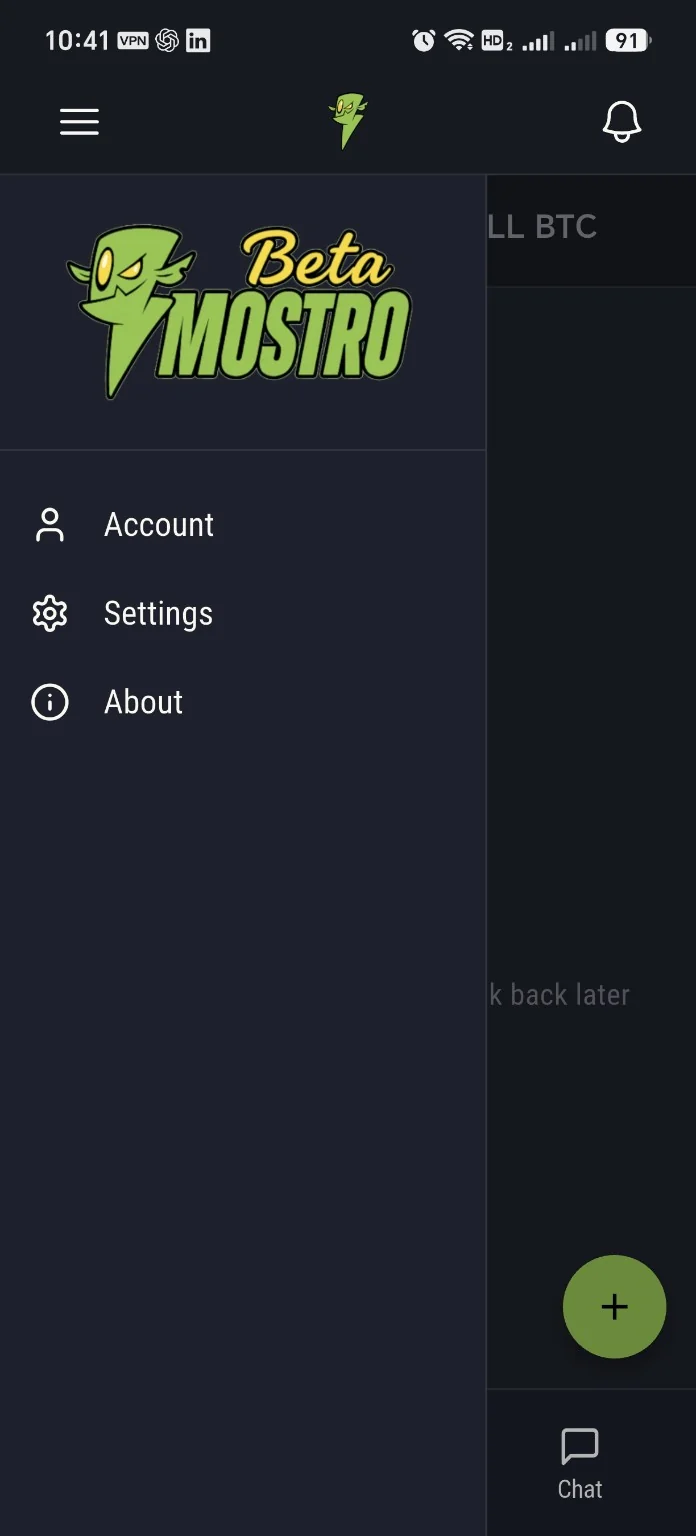
Mostro Mobile side menu showing Settings

Open the side menu and tap Settings.

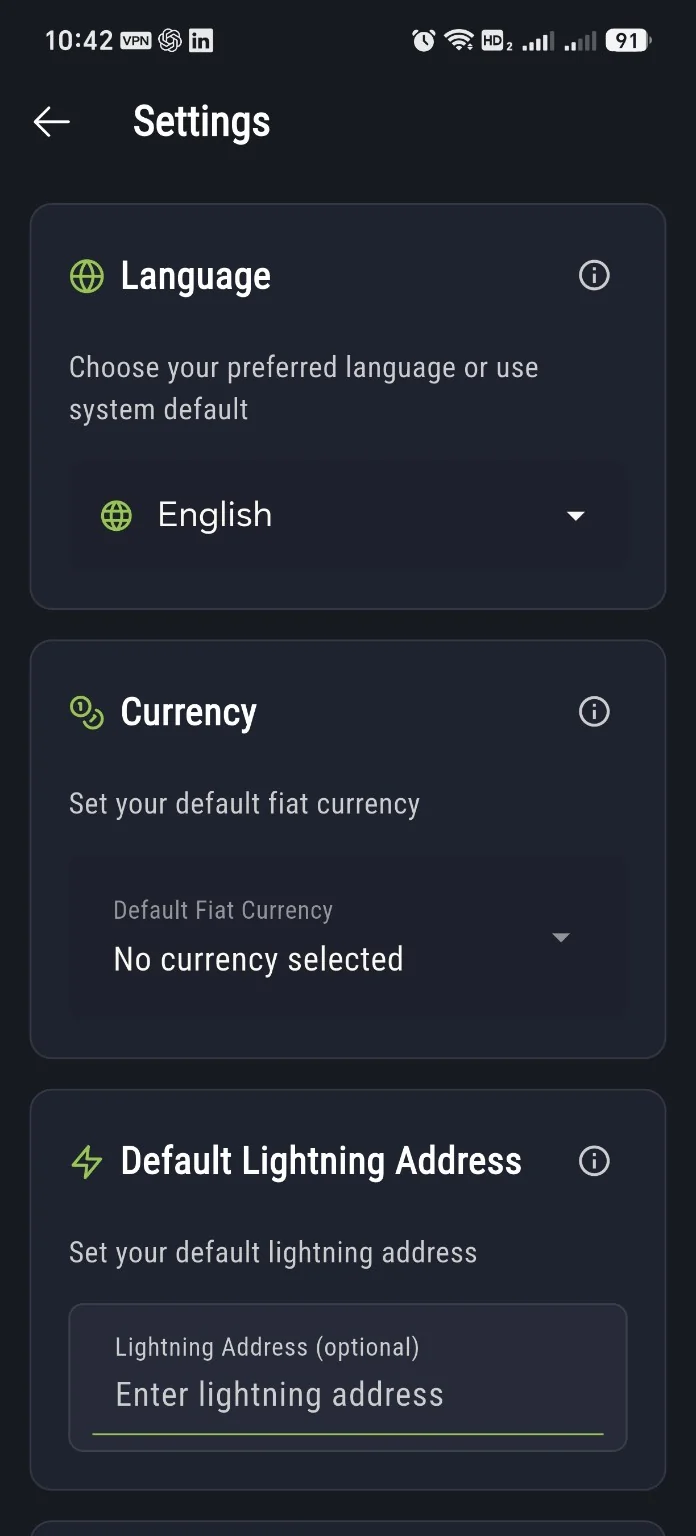
Top of the Mostro Mobile Settings page

On the Settings page, scroll down. The Mostro section is further down the page.

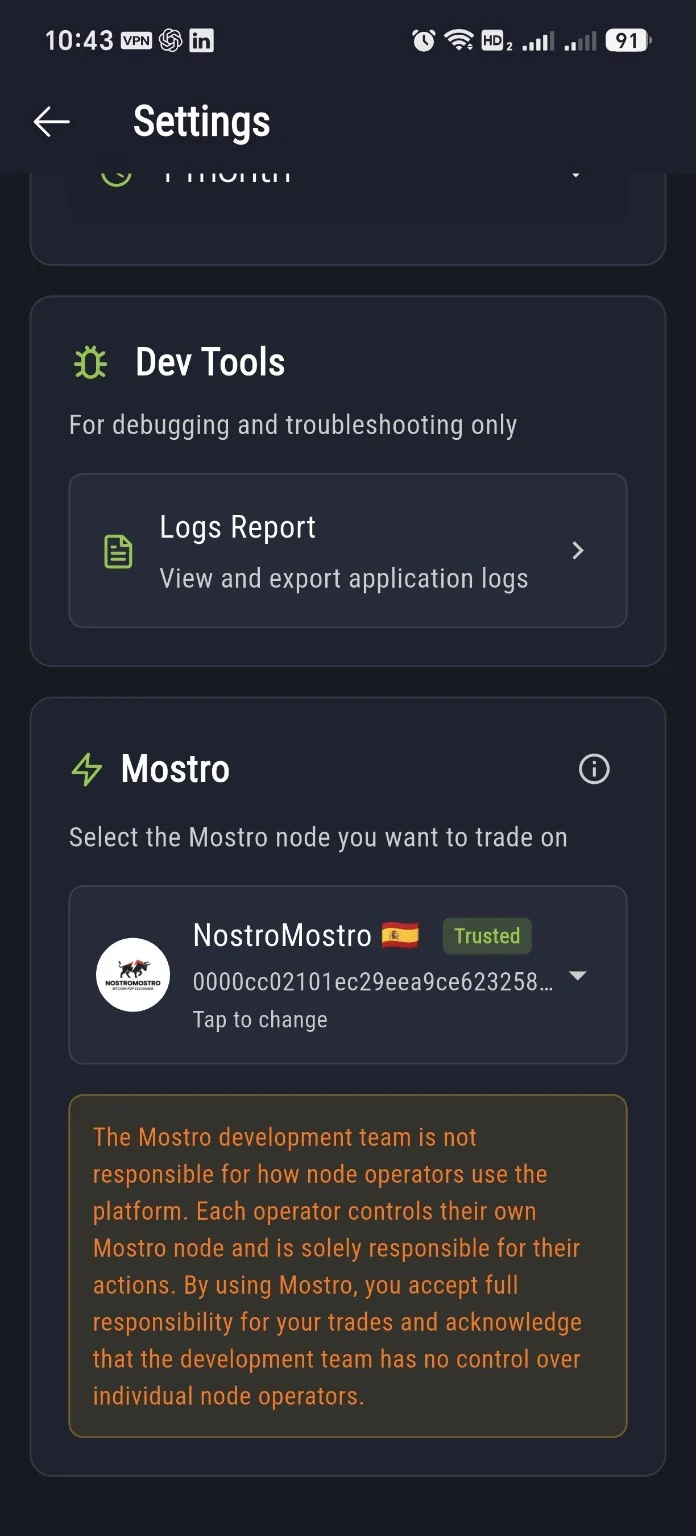
Mostro section in Mostro Mobile Settings showing the selected node

Find the Mostro section and tap the current node card marked Tap to change.

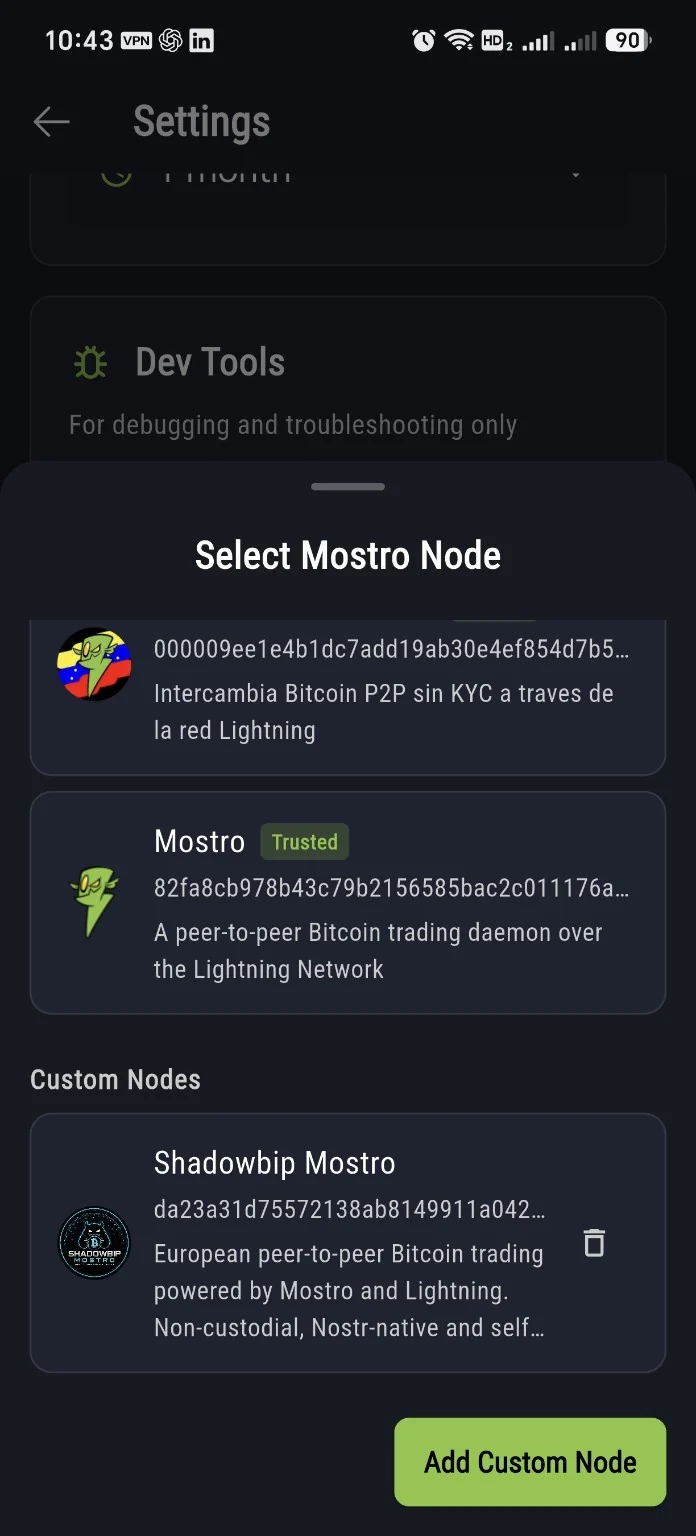
Mostro Mobile Select Mostro Node screen with Custom Nodes and Add Custom Node button

In Select Mostro Node, scroll to Custom Nodes and tap Add Custom Node.

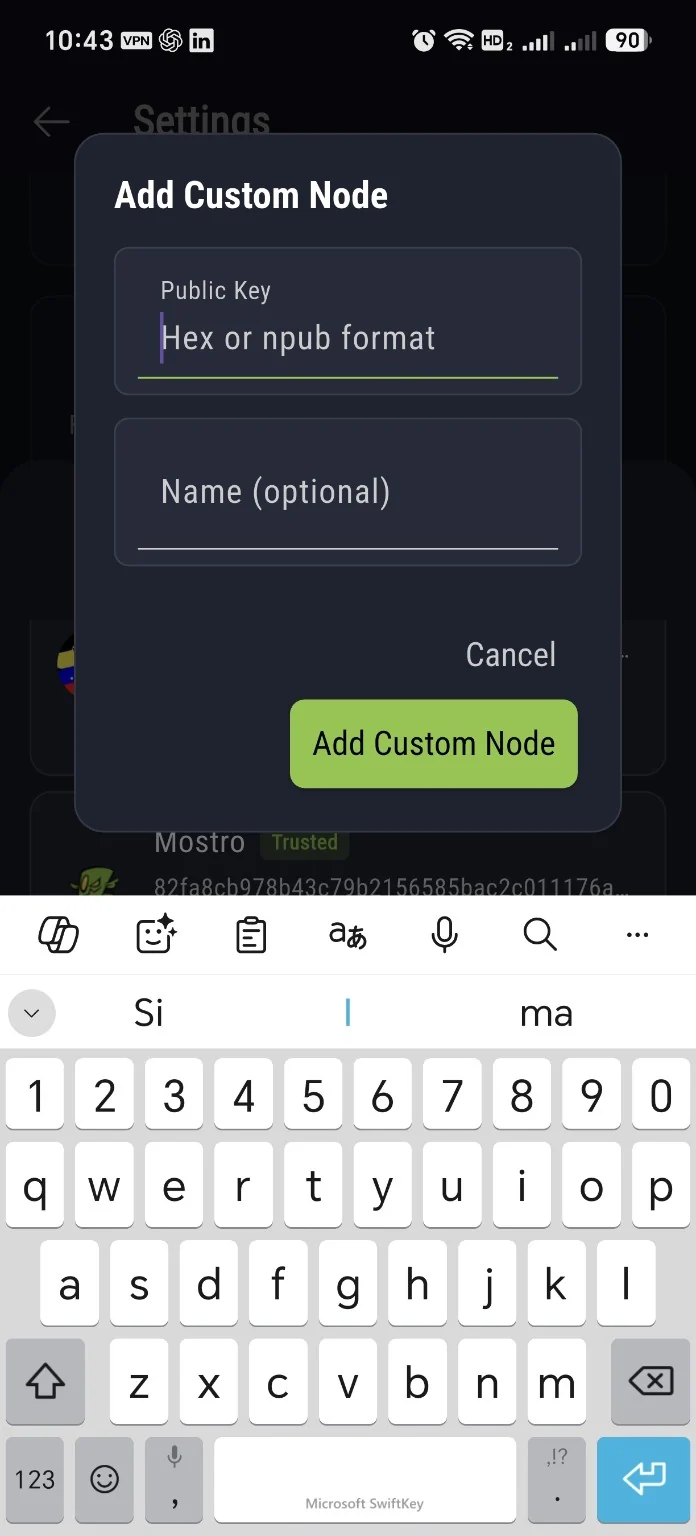
Mostro Mobile Add Custom Node dialog with Public Key field accepting hex or npub

Paste the MostroEuropa npub into Public Key. The app accepts hex or npub. Name is optional. Then tap Add Custom Node.

Paste this exact public key into the Public Key field:

npub1mg36x8t42usn32upfxg35ppzfqf2xj76v7w2hf7trqj0ma79jtkqrj3q9m

After adding it, the coordinator appears under Custom Nodes. The screenshots currently show its existing public metadata name, “Shadowbip Mostro”.

Before your first trade

Back up the recovery phrase generated by the client. If you configure a default Lightning Address, use an address you control and verify it before relying on it for a trade.

Configure MostriX for MostroEuropa

MostriX stores its configuration in ~/.mostrix/settings.toml. The official MostriX documentation exposes the coordinator public key, relays and currency filters in this file.

  1. 01. Install and launch MostriX once so its configuration is created.
  2. 02. Open ~/.mostrix/settings.toml.
  3. 03. Set mostro_pubkey to the MostroEuropa npub.
  4. 04. Configure the Nostr relays with the three MostroEuropa relays listed below.
  5. 05. Optionally adjust your currencies filter to the fiat markets you want to see.
  6. 06. Start MostriX and open Mostro Info to verify that the instance information matches the MostroEuropa coordinator.
Official MostriX guide ↗

Ready-to-use configuration

mostro-cli requires MOSTRO_PUBKEY and RELAYS. The CLI accepts the coordinator npub or hex public key.

export MOSTRO_PUBKEY="npub1mg36x8t42usn32upfxg35ppzfqf2xj76v7w2hf7trqj0ma79jtkqrj3q9m"
export RELAYS="wss://relay.mostro.network,wss://relay.shadowbip.com,wss://mostro-p2p.tech"

mostro-cli listorders

Important

On first use, mostro-cli creates your local user identity and a 12-word mnemonic. Back it up before trading. The CLI does not automatically load a .env file; export variables or source them from a shell file yourself.

Official mostro-cli configuration ↗
wss://relay.mostro.network
wss://relay.shadowbip.com
wss://mostro-p2p.tech

MostroEuropa
instance information.

0.18.4

Protocol 2 · NIP-44 direct

0.6%

Configured coordinator fee

100 — 1,000,000 sat

Minimum / maximum order amount

0

Anti-abuse bonds enabled

EUR GBP CHF PLN CZK HUF RON SEK DKK NOK ISK ALL BAM MDL MKD RSD UAH
npub1mg36x8t42usn32upfxg35ppzfqf2xj76v7w2hf7trqj0ma79jtkqrj3q9m

You need a
Lightning wallet.

Mostro uses Lightning for the Bitcoin side of the trade. Use a wallet you control and understand.

Phoenix

A commonly used self-custodial Lightning wallet suitable for receiving and paying Lightning invoices.

Official website ↗

Zeus

A self-custodial Lightning wallet and node interface widely used by experienced Lightning users.

Official website ↗

Receive sats

The buyer provides a Lightning invoice where the sats will be received. Clients that support a configured Lightning Address may simplify this step.

Pay the hold invoice

The seller pays Mostro's Lightning hold invoice. A hold invoice can remain pending or in-flight during the trade; follow the Mostro client workflow until the trade is settled or released.

Understand the flow.
Start small.

Mostro reduces reliance on traditional custodial exchanges, but peer-to-peer trading still requires you to understand Lightning, the payment method and the trade state shown by your client.

Verify the coordinator

Use the coordinator npub, not a display name alone.

Keep the trade inside Mostro

Do not move the settlement process outside the protocol while a trade is active.

Back up your client identity

If your client gives you a mnemonic or recovery phrase, store it safely before you depend on the client for active trades.

MostroEuropa is
a community first.

We are building a European community around the Mostro protocol. The coordinator is the infrastructure we operate; the community is the people who use it, help each other and build reputation over time.

Community channels coming soon